
Quiet Sleep Free4.8 - Get APK
You'll be able to download in few seconds.
Publisher Description
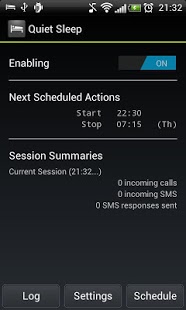
Quiet Sleep is the easiest way to automatically silence calls that are not urgent while still being able to receive emergency calls. Quiet Sleep lets you have a silent sleep without the fear of missing out on important calls.
How does it work?
Quiet Sleep monitors incoming calls and silences the phone so you won't be disturbed. Quiet Sleep can also send an SMS to the silenced caller explaining why you have not picked up their call (SMS content can be customized). If the same caller calls several times in a defined amount of time the sound will automatically be turned up so you can answer the important call (the mentioned factors can be adjusted in the preferences). The homescreen widget lets you turn the app on and off very quickly before and after you go to sleep.
Why use this app?
Quiet Sleep is a great do not disturb app that is very similar to the real life do not disturb sign since it lets people know that you would rather not be disturbed, but they are still able to contact you if they find it necessary.
Quiet Sleep is a must have for people who want a peaceful sleep but are afraid of turning off the phone and thereby taking the risk of missing an emergency call. It is also very useful for you if you are one of the many who likes to take a nap during the day or if you are working in the night and needs the silent sleep during the day, where people might call you.
Key Features
* Homescreen widget for easy access to turning Quiet Sleep on and off.
* Schedule when Quiet Sleep should be enabled or disabled.
* Automatic SMS sending to silenced callers.
* Whitelist contacts that can always get through the Quiet Sleep filter.
* Whitelist contacts that SMS can be send to.
* Sound volume and mode is automatically reset after handling each call and after turning Quiet Sleep off again.
* Add special tag to SMS messages to tell the silenced caller how many more times they must call to get through and how many minutes they have to make those calls.
* Session Summary showing number of calls handled and SMS' sent.
* And more customizable behaviour.
Other Usage Areas
The functionality of Quiet Sleep can also be used for other purposes, such as busy work situations. Actually the core functionality is much like the new iOS 6 feature called "Do Not Disturb" - but Quiet Sleep has already been out for a year, and therefore contains more than the iPhone 5 promoted feature ;)
The Quiet Sleep app can also be used like a call blocker (by disabling ringtone and vibration) with an automatic SMS response.
Paid version advantages
* No ads!
* Option to not show the summary after each session
* Much prettier summary dialog!
Find it here: http://apps.akosta.dk/quiet-sleep-paid/
About Quiet Sleep Free
The company that develops Quiet Sleep Free is AkostaApps. The latest version released by its developer is 4.8.
To install Quiet Sleep Free on your Android device, just click the green Continue To App button above to start the installation process. The app is listed on our website since 2013-04-03 and was downloaded 0 times. We have already checked if the download link is safe, however for your own protection we recommend that you scan the downloaded app with your antivirus. Your antivirus may detect the Quiet Sleep Free as malware as malware if the download link to akostaapps.quietsleep.free is broken.
How to install Quiet Sleep Free on your Android device:
- Click on the Continue To App button on our website. This will redirect you to Google Play.
- Once the Quiet Sleep Free is shown in the Google Play listing of your Android device, you can start its download and installation. Tap on the Install button located below the search bar and to the right of the app icon.
- A pop-up window with the permissions required by Quiet Sleep Free will be shown. Click on Accept to continue the process.
- Quiet Sleep Free will be downloaded onto your device, displaying a progress. Once the download completes, the installation will start and you'll get a notification after the installation is finished.
Program Details
System requirements
Download information
Pricing
Version History
version 4.8
posted on 2013-04-03
Several fixes and updates
version 4.8
posted on 2013-04-03
v 4.8,Greatly improved the edit SMS content dialog.,Added Quiet Sleep signature in free version (removeable by buying paid version).,Now only auto responds once to SMS messages (setting added to auto respond each time).,Changed default message to fit a single SMS.,Added version change dialog.,Attempted to fix the whitelist crash bug.
Disclaimer
External Download
We do not host Quiet Sleep Free on our servers. We did not scan it for viruses, adware, spyware or other type of malware. This app is hosted by Galad and passed their terms and conditions to be listed there. We recommend caution when installing it.
The APK Download link for Quiet Sleep Free is provided to you by apps112.com without any warranties, representations or guarantees of any kind, so access it at your own risk.
If you have questions regarding this particular app contact the publisher directly. For questions about the functionalities of apps112.com contact us.
